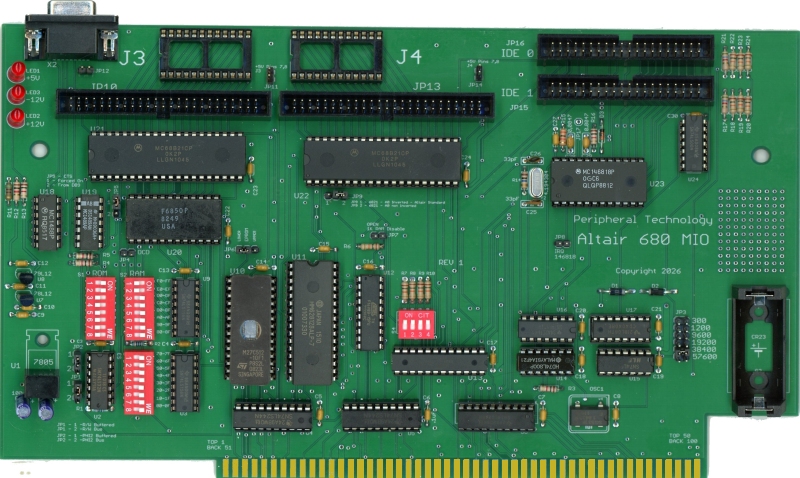
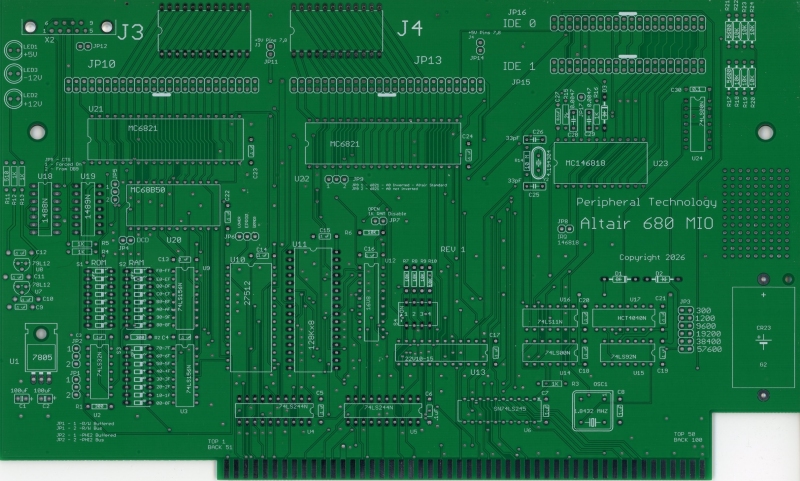
The assembled board includes an upgraded SWTBUG monitor. This monitor has additional improvements over the original SWTBUG monitor. Some of the enhancements are a memory test, disassemble from memory, trace, memory dump, and the ability to boot FLEX from the IDE, the serial port, or the parallel port.
The serial and parallel ports use the same address as the MITS UIO board and can be set on 16 bit boundaries like the UIO board. The parallel ports have the same 24 dip connector used in the UIO board as well as a 50-pin header used in other Peripheral Technology products.
SWTBUG
SWTBUG for the Altair has many features. The commands are listed below:
A
- Disassemble from memory
B xxxx - Set Breakpoint at address xxxx
C - Clear SWTPC CT-1024 terminal screen
D - Boot Disk - Loads from sector 0
E - Punch end of tape code
F yyyy xxxx zz - Find byte zz from address xxxx to
address yyyy
G - Execute program from address stored at A048-A049
J xxxx - Execute program at address xxxx
H - Reenter FLEX - jump to address AD03
I xxxxx yyyy zz - Set memory from xxxx to yyyy with zz
L - Load S records
M xxxx - Memory examine/change
O - Optional Port Command
P - Print S Record from address stored at A002-A005
Q xxxx yyyy - Test memory from xxxx to yyyy
R - Register Dump
T - Trace Command
U - Boot Floppy - Load from sector 1
V xxxx yyyy - View HEX/ASCII from address xxxx to yyyy
W - Boot from IDE Controller
Altair 680 Commands
S - Boot
Serial FLEX
X - Corsham SD Utilities and Boot
Z - Jump to Altair Monitor
Corsham SD Extensions
X = Return to SWTBUG
B = Boot from SD card
P = Ping SD controller
D = Do directory of SD card
T = Type file from SD card
L = Load SREC file from SD card
FLEX for the Altair 680
There are three ways to boot FLEX on the Altair 680. With a UIO board you can boot serial FLEX; with an MIO you have three ways to boot FLEX.
1- Boot FLEX using the IDE port.
2 - Serial FLEX using the MIO serial port.
3 - FLEX using a parallel port and the Corsham SD Card system.
Boot Flex from IDE:
FLEX using an IDE/SD Adapter. Assembled and tested MIO boards come with an SD/IDE and FLEX preloaded on an SD Card. If you are building a bare board you need to acquire an SD/IDE adapter.
SD/IDE adapters are sold on AMAZON and EBAY. As long as it looks like the one below, it should work. I have purchased many units from many different sources, and they all appear to be identical.

This board should be plugged into IDE Port 0. You will need to download the FLEX image and write it to an SD Card. A "W" command on SWTBUG will boot FLEX.
Boot Flex from Serial Port
A serial disk server is installed on a PC. A serial cable connects from the MIO board to your PC. An "S" command on SWTBUG will boot FLEX.
Boot Flex from Parallel Port
The Corsham SD Card System uses the parallel port. To boot FLEX using a Corsham SD Card System you need an adapter board connecting the 50-pin PIA connector to the Corsham Card System. To boot FLEX the "X" command from SWTBUG starts Corsham SD utilities. Then a "B" command will boot FLEX. A reproduction of the Corsham card system is available - https://peripheraltech.com/Corsham-SD.htm
Which Method of Booting FLEX Should I Use ?
Each method has advantages and disadvantages.
Serial FLEX - Lowest cost - only a serial cable between MIO and a PC. Speed similar to a floppy. Low disk capacity.
IDE FLEX - Fastest speed, minimal cost, partitions can be up to 16MB and supports 256 partitions.
Corsham Card System - Unless you already have one, this is the highest cost option. Slightly faster than Serial FLEX, can have large emulated disks. The SD card has a PC compatible file format allowing managing disk images in a PC. Expect this option to cost around $100.
The IDE boot is the best all-around choice with fast speed and low cost. An SD/IDE adapter, 40 pin cable, and an SD card can be obtained for under $30.
The MIO is available in either a bare or an assembled board. The assembled board ships with the SWTBUG monitor installed, an SD to IDE adapter, a cable, and an SD card preloaded with FLEX ready to boot.
Downloads
Manuals:
MIO User Manual User Manual and Parts List for MIO
SWTBUG-V1.303A.pdf SWTBUG User Manual
Source Code - SWTBUG
SWTBUGV3.03A.zip Source code for SWTBUG for the Altair 680
EPROM - SWTBUG for Altair 680
SWTBUG-V1.303A.BIN Binary of EPROM - 8K place at E000-FFFF in EPROM
SD Card Image
UnZip this image and copy to an SD card. One program that will copy from a file to SD is Win32DiskImager. It can be downloaded from - https://win32diskimager.org/ . The format of the SD card is not compatible with a PC. The file contains a raw image that is written to the SD card starting with LSN 0. The resultant SD card does not have a PC compatible file structure. You cannot examine the SD card using file manager on your PC. Your PC may even prompt you to format the SD after imaging the SD. Don't format it. The SD is ready for use in a SWTPC system.
When inserting an unformatted SD or one that has been imaged with FLEX/OS9 your PC will ask if you want to FORMAT the SD. Don't FORMAT! Ignore all the warnings and start Win32DiskImager.
Altair680B.zip The first 11 FLEX partitions. This is a copy of the SD card that ships with the MIO
JED PAL FILES
Software Manuals
Flex 2.0.pdf FLEX 2 User's Manual
FLEX 2.0 Advanced Programmers Manual.pdf You need this if you want to write programs.
TSC_6800_Editor.pdf Disk based EDIT User Manual not available - use "S" command to save to disk, EDIT <filename> to invoke
TSC6800 Assembler TSC 6800 Assembler Manual
XBASIC.PDF TSC XBASIC User Manual
BASIC.PDF TSC BASIC User Manual
A-BASIC V2.1F Compiler Reference Manual.pdf
A-BASIC FLEX Interpreter Reference Manual.pdf
| MIO-Bare | MIO Board - Bare | $39 |
| MIO-ASM | MIO-ASM 64K RAM,27512 EPROM, SWTBUG, SD/IDE Adapter with SD card - FLEX ready to boot. | $189 |
| MIO-SD | SD/IDE Adapter with SD card - FLEX loaded | $29 |
| MIO-PAL | PAL set for MIO | $10 |
| ALTAIR-IDE | SD Memory to IDE Adapter, Cable, 32GB Memory Card and FLEX preloaded and ready to boot. | $30 |
| ALTAIR-SD-CASE | Case for two SD/IDE Adapters - Styled similarly to Altair 680 case | $20 |